If you’ve ever opened an AI art generator’s pricing page and wondered how credits relate to subscriptions, you’re not alone.
It’s actually a bit tricky because AI anime pricing models rarely charge you for “an image” in a simple way. The cost can change with the model, resolution, number of generations, or the features you’re using. And having credits still doesn’t mean you can do anything you want on the platform.
To keep your expenditure in check, it’s good to understand how anime AI credits and memberships work. We’ll use PixAI as an example and break down the concept through actual workflows.
What are AI anime generator credits?
Think of credits as the currency you use to perform certain actions in an AI art generator. Instead of paying separately for every image, you usually buy or receive a pool of credits that gets used as you generate images or access other resource-intensive features.
The important part to note is that AI anime credits don’t always have a fixed value. One generation might use a different amount from another depending on the model, image dimensions, or settings. So, having 100,000 credits doesn’t tell you much until you know what those credits can actually buy.
Why does one generation cost more than another?
The difference in cost of generation depends on model choice, the image size and settings, and the features you are using.
Model choice
Different AI models can have different generation costs. Some are designed for relatively quick image creation, while others use more computational resources or offer additional capabilities.
Before generating, check the credit cost displayed for each model. A model that uses more credits per generation will affect how many variations you can afford to create.
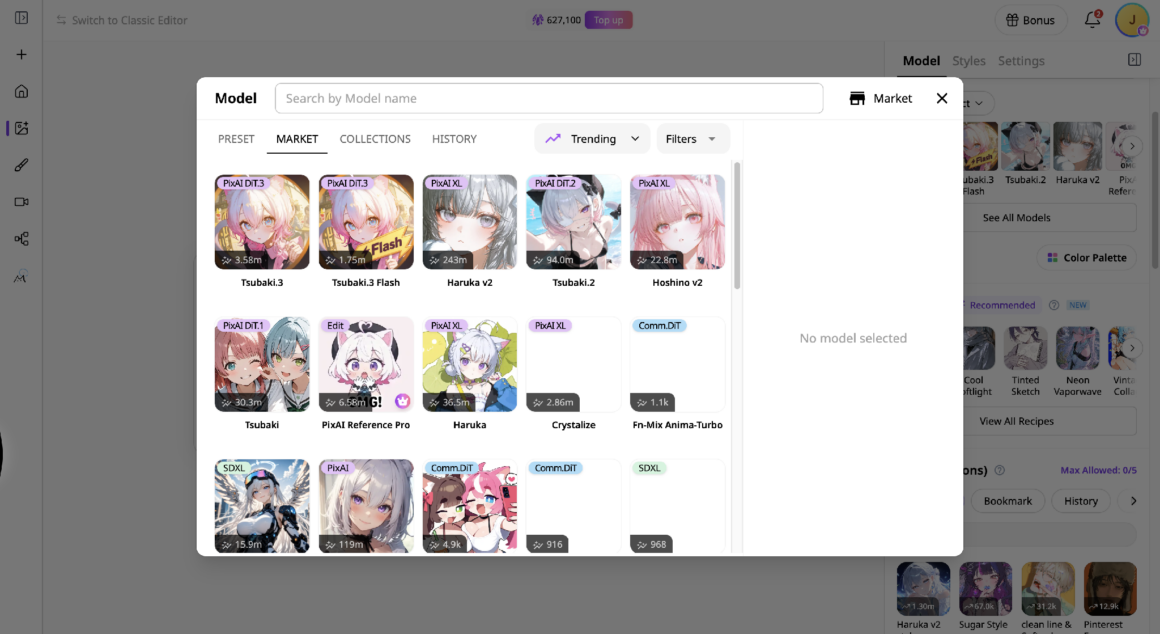
Image size and generation settings
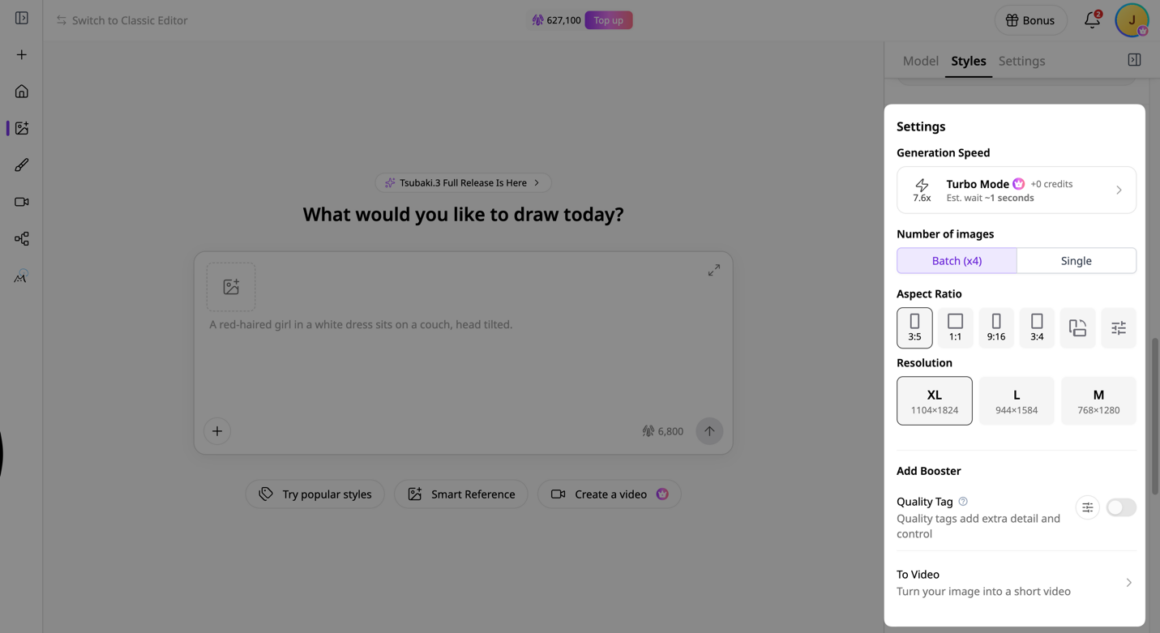
Image dimensions and generation settings can also affect credit consumption. Larger images or more demanding settings may require additional credits, depending on the model and platform.
For example, Turbo mode (7.6x) is free with membership, but High priority (10x) requires 1,000 extra credits. Generating four image variations instead of one also understandably costs more.
Advanced features
Some features consume more credits because they involve more processing than standard image generation. Editing an existing image, generating a video, or training a LoRA can have different credit costs, depending on the platform and the settings you choose.
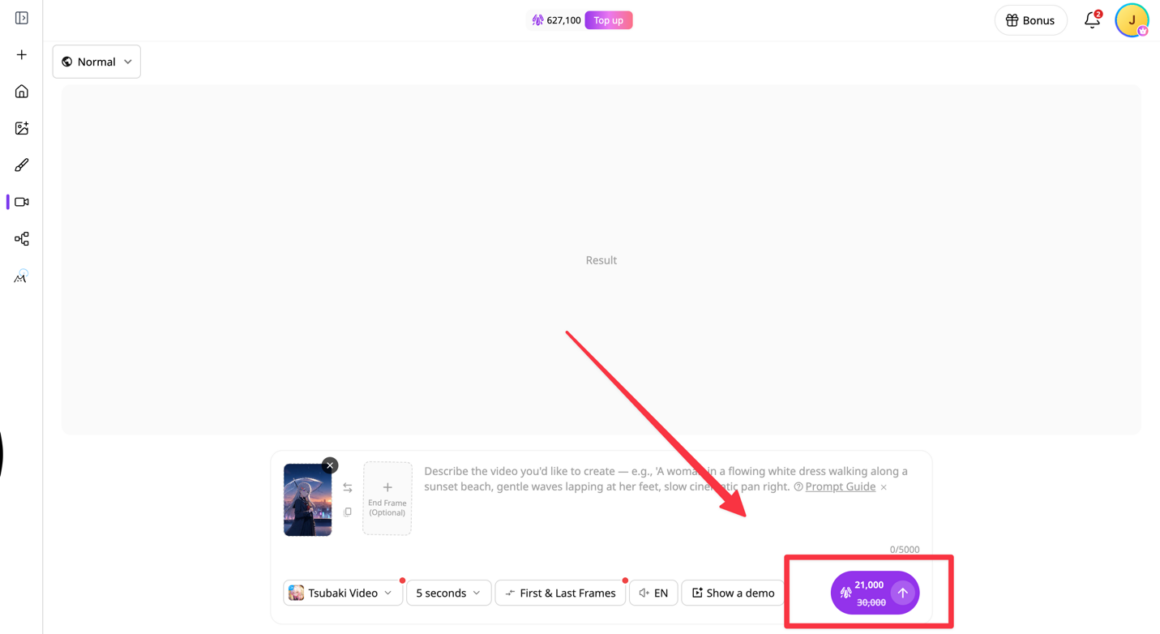
For instance, a 5-second video has hundreds of image frames, so you can expect it to cost about 20 times as many credits as generating a single image.
What are you actually paying for with a membership?
A membership usually gives you more than an additional pool of credits. Depending on the platform and plan, it can also unlock features, improve generation speeds, and give you more flexibility over how you create.
More generation capacity
One of the main reasons to subscribe is to generate more images without constantly worrying about running out of credits.
Say you’re developing an original character. You might need several attempts to settle on the design, followed by different poses, expressions, outfits, and backgrounds. Those generations add up, particularly if you’re experimenting with several models.
A membership with a larger credit allowance gives you more room for that kind of ongoing work. However, it’s still worth checking how and when credits are distributed, whether they expire, and what happens to unused credits when your membership ends.
Faster generation
Generation speed becomes more important as you start creating regularly. Waiting for an occasional image is one thing, but waiting through dozens of variations can interrupt your workflow.
PixAI offers faster generation speeds (known as turbo mode) as a membership benefit. You can also increase the speed further with extra credits.
Access to advanced features
This is where membership differs most clearly from simply buying additional credits. Some tools require an active membership, regardless of how many credits you have.
PixAI, for example, offers membership features such as Reference Pro, video generation, and LoRA training. These support different stages of a creative project, from refining an existing illustration to developing custom character models or turning still images into animated scenes.
Credits vs. subscriptions vs. pay-as-you-go
Most AI anime pricing models offer some combination of free credits, monthly memberships, and additional credit purchases. Each works a little differently, so the right option depends on how frequently you create and how predictable your usage is.
Free credits
Free credits give you a chance to explore a platform before committing to a paid plan. You can use them to test prompts, experiment with available models, and see how the generator fits your creative process.
They’re particularly useful when you’re learning. You can try a few variations of a character, compare different settings, and get a feel for how quickly your usual workflow consumes credits.
Monthly memberships
A monthly membership generally combines a recurring credit allowance with additional benefits. Depending on the platform, those benefits can include faster generation, more image dimensions, or access to advanced creation tools.
Additional credit purchases
Some platforms let you purchase extra credits without changing your subscription. This is useful when your usual allowance covers most of your work, but a particular project requires more generations.
Say you’re preparing a collection of illustrations and have already used most of your monthly credits. Buying an additional credit package may make more sense than moving to a higher membership tier for one unusually busy month.
However, extra credits don’t necessarily unlock additional features. Before purchasing them, check whether the task you want to complete is available under your current plan.
How to estimate your monthly AI anime art costs
Once you understand how AI art credits work, you can start estimating how many you’ll actually need. You don’t have to calculate the cost of every image in advance. A rough estimate based on your usual creative process is enough to help you compare plans.
Let’s use a small anime character project as an example.
Estimate your generations
Start with the number of images you expect to create in a typical month. Think about your finished illustrations, character concepts, and any other artwork you regularly generate.
Say you want to create four finished illustrations of your original character. If each one takes five generations to get right, you’re already looking at around 20 generations.
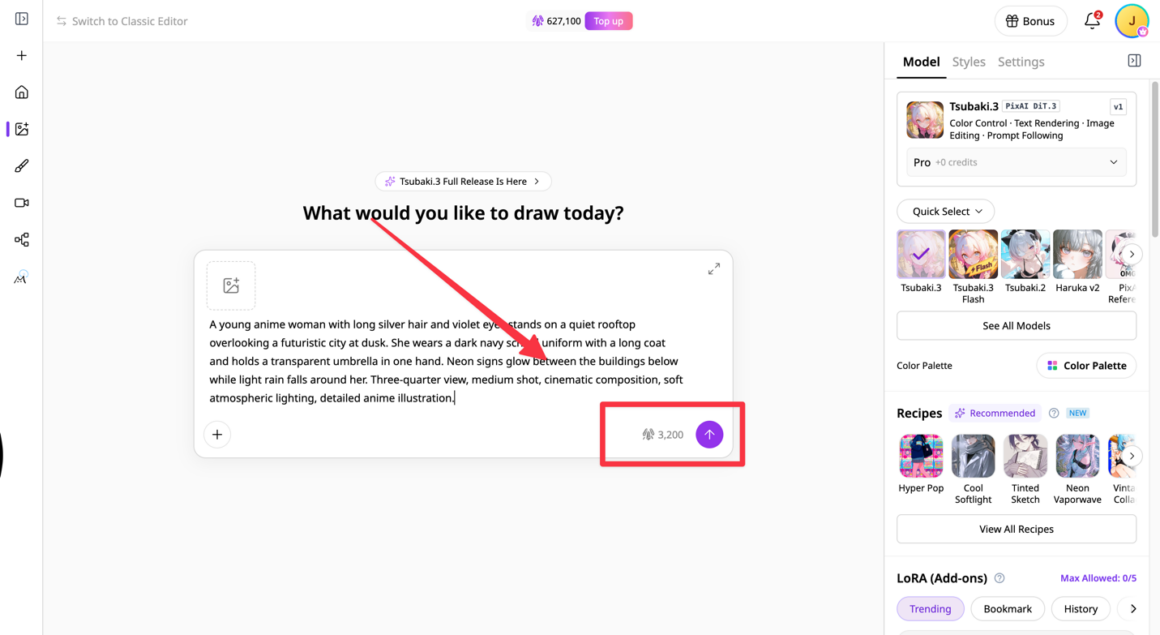
Check this based on the model you want to use because they vary. For example, PixAI’s Tsubaki.3 requires 4,400 credits for regular generation, while Haruka v2 requires 7,200 credits.
Account for iteration
Your first estimate probably won’t cover everything. You might change your character’s outfit, experiment with another model, or generate several versions of a scene before finding one you like.
These extra attempts are part of the creative process, so include some room for them in your credit budget. If you’re not sure how many you’ll need, look at your generation history from a recent project. Note that image-to-image generation usually takes more credits than text-to-image generation, even when using the same model.
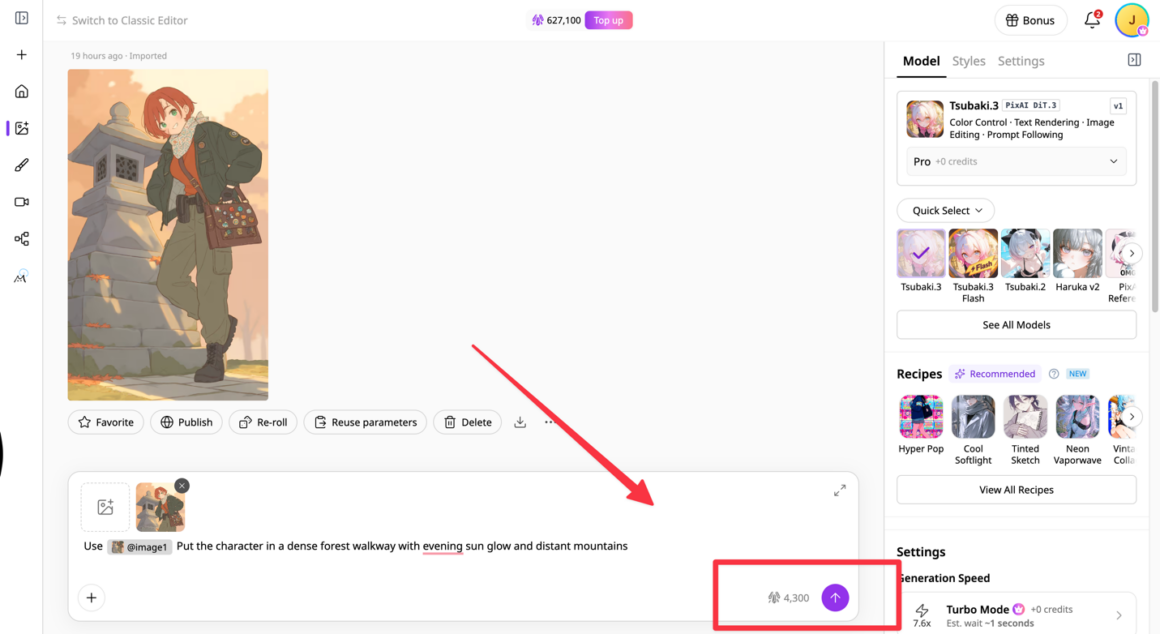
Add specialized usage
Next, consider whether you’ll use features that have different credit costs from standard image generation.
Perhaps you want to train a custom LoRA for your character or turn a finished illustration into a short animated clip. Check the credit requirements for those tasks separately, along with any membership requirements.
This is particularly important for occasional projects. Your normal image-generation budget might be sufficient most months, but adding video generation or another resource-intensive task can change your requirements considerably.
What to check before buying an AI anime generator plan
Before choosing a plan, look at how its credits, features, and usage rules fit the way you actually create. A large credit allowance can sound attractive, but you won’t get much value from paying for tools you’ll rarely use.
Here are four things worth checking before you subscribe.
What your credits actually cover
Find out how much your usual activities cost. Start with your preferred model and generation settings, then check the credit requirements for anything else you plan to use, such as video generation or LoRA training.
For example, if you mainly create still anime illustrations, estimate how many generations your monthly allowance will cover. If you also want to animate those illustrations, include the additional credit costs in your budget.
Whether unused credits carry over
Check what happens to your remaining credits at the end of each billing period. Do they expire, reset, or stay in your account? Also, find out whether purchased credits follow the same rules as credits included with a membership.
PixAI lets you retain your remaining credits after your membership expires, although your access to membership-only features ends. This is useful to understand if you plan to subscribe for a particular project and then take a break.
Which features require which membership
Having enough credits or a starter plan doesn’t mean you can use every tool on the platform. Some features require a higher membership tier, so check the access requirements before purchasing a plan or additional credits.
Generation speed and image dimensions
Finally, check the practical benefits of each plan. Faster generation can save time when you’re producing many variations, while additional image dimensions give you more flexibility when preparing artwork for different formats.
These benefits matter differently depending on your workflow. If you create a few illustrations each month, standard generation speeds and dimensions may be sufficient. If you’re regularly producing character sheets, detailed illustrations, or artwork for multiple formats, the additional options may be more useful.
The easiest way to compare AI anime generator plans is to start with your typical project and work backward. Estimate the credits you’ll need, identify any membership-only features you’ll use, and then check which plan covers both.
A simple way to think about AI anime pricing
Before choosing a plan, consider how you create, how quickly you use credits, and whether you need any membership-only features.
This quick comparison can help you work out what to look for.
|
Your situation |
What to check |
What it means for your budget |
|
You create a few images occasionally |
Free credits and standard generation costs |
Free access may cover your needs. |
|
You experiment with models and generate lots of variations |
Credit cost per generation and monthly allowance |
Estimate how quickly your experiments use up credits. |
|
You regularly develop characters and larger projects |
Monthly credits and generation speed |
A membership may give you more room to iterate. |
|
You want to use Reference Pro, generate videos, or train LoRAs |
Membership requirements and feature-specific credit costs |
Having credits alone may not be enough. |
|
You have unused credits but your membership is ending |
Credit retention and access after expiration |
You can retain your PixAI credits, but membership-only features become unavailable. |
|
You occasionally need extra generations |
Additional credit purchases |
Buying extra credits may be sufficient if you don’t need additional features. |
Final thoughts
Understanding anime AI pricing models makes it easier to plan your projects and keep your spending under control. The key is to consider both how many credits you need and which features your workflow requires.
In PixAI, you can use credits for regular image generation, while features such as Reference Pro, video generation, and LoRA training require membership. However, even when your membership expires, your remaining credits stay in your account, although the ways you can use them become more limited.
Ultimately, the number of credits you need and the membership plan you choose should be based on what you want to achieve and how you like to work.